I built a Xero AI chat agent inside Copilot and Teams using Copilot Studio

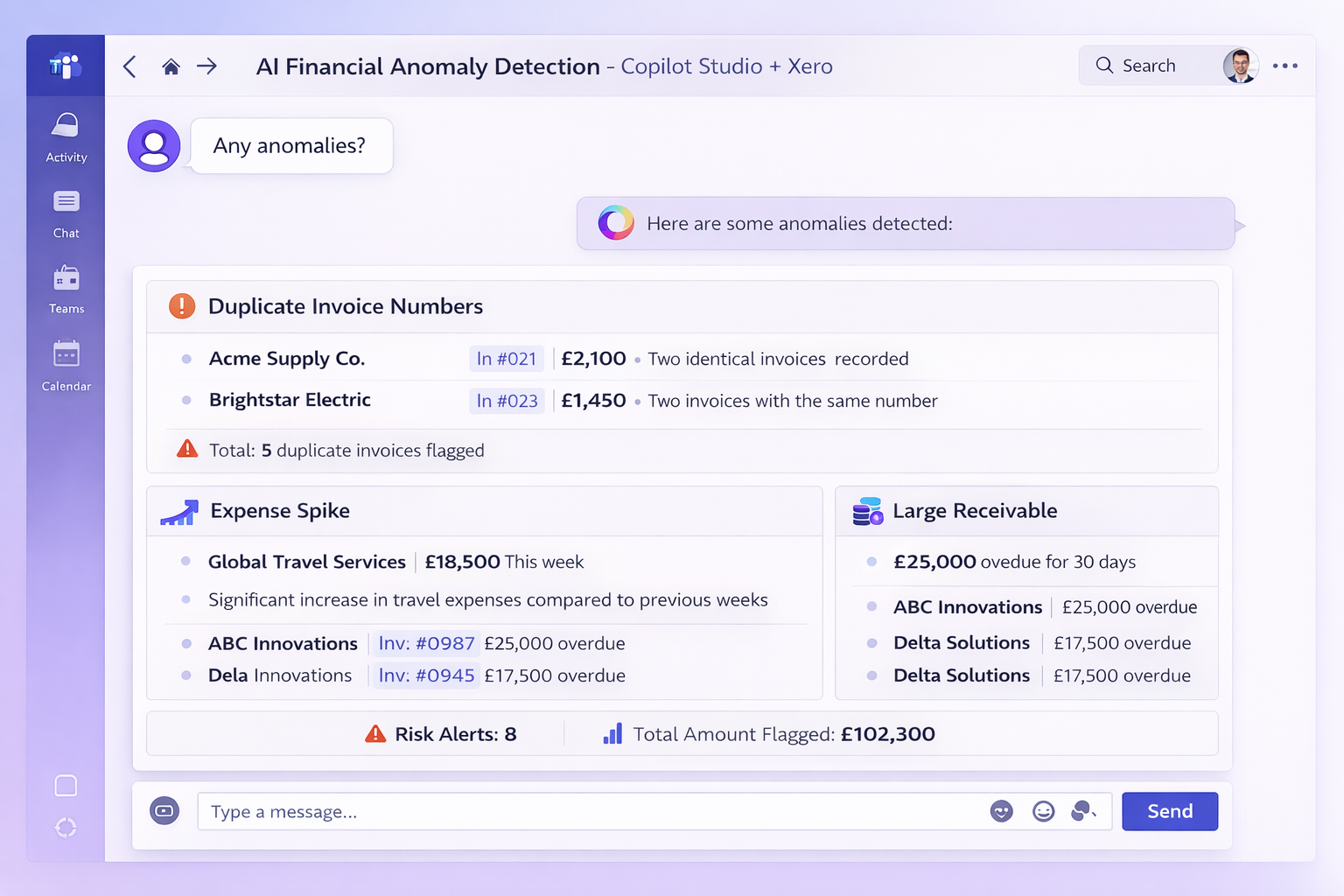
Most small businesses already have the data they need to spot financial problems early. The issue is that nobody has time to constantly review invoices, suppliers, and payment patterns looking for anomalies.
So I built a small experiment. An AI agent that connects to Xero and monitors invoice activity, highlighting unusual patterns directly inside Microsoft Teams.
The goal wasn't to build something flashy. It was to see how practical Microsoft's AI tools actually are for real SME scenarios.
Microsoft's AI stack
There's a lot of confusion around the different "Copilot" products, so here's the simple version.

Copilot Chat The AI assistant built into Microsoft 365. It helps with emails, documents, spreadsheets and general questions using your organisation’s data.
Copilot Studio A platform for building custom AI agents that can connect to APIs, retrieve data and automate workflows.
Microsoft (Azure AI) Foundry A much more developer-focused environment used for building large-scale AI systems and custom models.
For most SMEs looking to automate tasks or extract insights from existing systems, Copilot Studio is the sweet spot. It lets you build useful AI agents without needing a full AI engineering team.
The idea: an AI financial anomaly monitor for Xero
Many businesses rely heavily on Xero, but spotting unusual activity still means manually reviewing reports. Instead, I built an agent that scans recent invoice activity and flags patterns like:
- duplicate or reused invoice numbers
- sudden spikes in supplier costs
- unusually large receivable invoices
- new vendors appearing for the first time
- recurring high-value payments
- customer payment deterioration
Instead of digging through reports, the user can simply ask:
“Any anomalies?”

Running the agent inside Teams
The agent is built using Copilot Studio and published directly into Microsoft Teams, so it behaves like a normal chat assistant.
Behind the scenes it:
- Retrieves invoice data via the Xero API and Copilot Studio AI Flows
- Runs a small workflow to structure the data
- Passes the summary to the AI model
- Highlights any patterns that look unusual

Rather than listing transactions, the agent behaves more like a financial analyst, identifying the most relevant issues and explaining why they might need attention. It's worth noting that none of this is real data. All data from this prototype is using the Xero "Demo Company".
The small prompt that allows the invoice processing to happen is as follows...
You are acting like a finance analyst for a small business owner.

Review the recent Xero invoice data below and highlight only the most important anomalies or patterns that may need attention.

Prioritise:
- duplicate or near-duplicate bills
- unusual spikes in invoice amounts
- suspicious or unfamiliar vendors
- recurring items that may be legitimate but deserve review
- anything that looks materially different from the normal pattern
- Overdue invoices
- Worsening customer payment patterns

Be selective. Only mention the top issues.
Do not list every high-value invoice unless it is genuinely unusual in context.

For each issue, give:
- anomaly category
- contact/vendor
- invoice number
- date
- amount
- why it was flagged
- recommended next action

Then finish with:
"What looks normal" for patterns that seem expected
"Overall risk level" as Low, Medium, or High
Under the hood, the agent is using a pattern often called Retrieval Augmented Generation (RAG).
In simple terms, the AI isn’t guessing or relying on generic knowledge from when the model was trained. Instead, it retrieves the latest invoice data directly from Xero, feeds that into the model, and asks the AI to analyse the real financial activity.
Drilling into a customer or vendor
If a large invoice is flagged, the agent can summarise useful context such as:
- account status
- outstanding balances
- contact information
- payment behaviour

This turns what would normally involve several reports inside Xero into a simple conversational workflow.
Why this matters for SMEs
Most SMEs already have valuable data sitting in systems like accounting software, CRMs and project tools. The challenge isn’t collecting data, it’s spotting the signals quickly enough to act on them.
Tools like Copilot Studio make it possible to layer a lightweight AI agent on top of those systems to surface anomalies earlier, reduce manual financial review, guide investigations with clear next steps and integrate directly into tools teams already use (like Teams).
This example is just a prototype, but it shows how AI can move beyond generic chat assistants and start acting more like a specialised operational tool.
From prototype to production
Obviously there’s still quite a bit to do before something like this would be production-ready.
Areas like security, authentication, access control, data governance, monitoring, and error handling would all need to be carefully designed. When an AI system is interacting with financial data, those considerations are critical.
But the encouraging part is how quickly a useful working prototype can be built. Tools like Copilot Studio make it possible to connect AI to real business systems in a matter of hours rather than weeks.
Where this could go next
There are plenty of directions this could evolve:
- automated daily financial anomaly checks
- proactive alerts when unusual activity appears
- trend analysis across longer accounting periods
- combining financial data with CRM or operational systems
For SMEs, the real opportunity isn’t just “using AI”, but embedding it into everyday workflows. And platforms like Copilot Studio make that much easier than it used to be.